
5 companies compared
The Study Comes First When Choosing UX Research Tools
These five tools rank by method fit, a verifiable entry price, and how clearly they reveal their limits. A strong research stack may use more than one of them, but the first purchase should solve the constraint in the current study.

By Jitendra Kumar Nirala, Founder · Updated 7 Oct 2026
On this page
- 01The shortlist
- 02How we ranked them
- 03The companies in detail
- 04How to choose
- 05Choose a moderator when a follow-up could change the finding
- 06Use unmoderated testing to see task friction across more responses
- 07A recruitment platform is the right purchase when the sample is the risk
- 08Use diary work when a single session would miss the context
- 09Test structure separately from interface design
- 10Buy software only after deciding who will run the research work
- 11Method and sources
- 12Frequently asked
The short answer
The right ux research tools follow the study design, not the feature list. Use moderated testing when follow-up matters, unmoderated testing for quicker directional evidence, recruitment platforms when access to the right people is the constraint, and specialist tools for information architecture or synthesis.
The shortlist
How we ranked them
- Fit for a distinct research decision
- Current, publicly verifiable entry price
- Clear boundary between testing, recruitment, IA, and synthesis
- Useful outputs for a product team
The companies in detail
User Interviews
A recruitment-focused option for teams that need screening, scheduling, incentives, and quota tracking.
- Best use
- Participant recruitment and research operations
- Entry price
- From US$49 per completed session
- Billing
- Pay as you go
User Interviews wins for teams whose study is ready to run but who need help finding and coordinating relevant participants.
Strengths
- Built around recruitment operations rather than only test delivery
- Includes screening, scheduling, incentive distribution, and quota tracking
- Offers a pay-as-you-go entry point
Limitations
- Advanced B2B targeting costs extra
- Recruitment does not replace moderation, study design, or analysis
Respondent
A per-session platform for teams recruiting consumer or professional participants.
- B2C rate
- US$40 per completed session
- B2B rate
- US$80 per completed session
- Incentives
- Funded separately
Respondent wins for teams that need a transparent B2C or B2B recruitment starting point and want to pay per completed session.
Strengths
- Separates B2C and B2B recruitment pricing
- Includes moderated and unmoderated research workflows
- Charges for completed sessions rather than no-shows or screener failures
Limitations
- Participant incentives are additional
- A recruitment platform cannot decide whether the study needs interviews, diary work, or usability testing
Optimal
A specialist option for teams testing navigation, content structure, prototypes, and related research tasks.
- Starter price
- US$199 per month, billed annually
- Study allowance
- Five launched studies per year
- Recruitment
- Purchased separately
Optimal wins for teams with a live information-architecture question, especially when card sorting and tree testing are central to the study.
Strengths
- Includes card sorting and tree testing
- Supports usability and prototype testing
- Starter includes unlimited seats and responses per study
Limitations
- Starter allows five launched studies per year
- Recruitment is an additional purchase
Lyssna
A platform for quick studies, self-recruited responses, and multiple testing methods.
- Free plan
- US$0 per month
- Free allowance
- 15 self-recruited responses
- Growth price
- US$166 per month, billed annually
Lyssna wins for teams that already have people to invite and want a lower-cost route into unmoderated testing before buying a larger programme.
Strengths
- Free plan includes three seats
- Free plan includes 15 self-recruited test and survey responses
- Supports card sorting, tree testing, prototype testing, and interviews
Limitations
- Participant panel responses cost extra
- The free response limit is small for repeated testing
Dovetail
A searchable place to organise calls, documents, surveys, and research projects after data collection.
- Free price
- US$0 per month
- Free limit
- One project and one channel
- Primary role
- Analysis and research repository
Dovetail wins for teams that already have research evidence but need a shared place to organise and retrieve it, not for teams that still need participants or a testing method.
Strengths
- Free plan supports one project and one channel
- Can analyse calls, recordings, documents, and surveys
- Provides AI summaries within the free project
Limitations
- The free plan is limited to one project
- It is not a participant recruitment or usability-testing tool
How to choose
- 1
Write the decision before choosing a vendor
Turn a request such as “test the new flow” into a decision such as “can first-time users complete checkout without help?” The decision determines the method, participants, and output. - 2
Separate access to people from the study platform
A platform can run a task, but it cannot automatically make the recruited sample relevant. Choose a recruitment platform when the team lacks access to actual or likely users. - 3
Choose moderation for explanations
Use a moderator when the team needs to ask why someone hesitated, clarify an action, or adapt a follow-up question during the session. - 4
Choose unmoderated work for quicker directional patterns
Use unmoderated testing when the team needs to see whether a wider group can use or navigate a design, and can accept less opportunity to probe each response. - 5
Use a diary or field approach for behaviour over time
A diary study is designed for real-time behaviour and needs over time. It requires participant support and a plan for maintaining engagement. - 6
Treat consent and retention as buying criteria
Ask how recordings, notes, consent records, access controls, redaction, retention, and deletion work before the team uploads personal research data.
Choose a moderator when a follow-up could change the finding
Moderated usability testing is designed for watching people attempt specific tasks, then asking about behaviour the team cannot explain from a recording alone. The UK Government’s guidance on moderated usability testing notes that think-aloud work can reveal what participants are doing, thinking, and feeling.
A moderator is useful for a prototype or live service when the team needs to understand whether people can complete realistic tasks and why a problem occurred. The trade-off is operational effort: sessions need scheduling, relevant participants, a discussion guide, consent, and time to review the evidence.
Use unmoderated testing to see task friction across more responses
Unmoderated testing is remote usability work without a live moderator. The Government Analysis Function’s guidance describes it as useful for quickly validating designs with a diverse group at scale.
This makes an unmoderated tool a strong fit for questions about ease, difficulty, navigation, first-click behaviour, and prototype task patterns. It is a weaker fit when the product team needs to explore a surprising answer in depth, because no researcher is present to ask the next question.
A recruitment platform is the right purchase when the sample is the risk
Recruitment is a separate decision from test delivery. If a study needs a specific job role, behaviour, location, or type of product experience, the team should confirm that it can reach actual or likely users before choosing the test platform.
User Interviews and Respondent are the two ranked options here because their entry pricing is tied to completed participant sessions. Their real cost is broader than the platform fee: screeners, incentives, scheduling, no-show management, and the time needed to check whether participants match the research question all affect the study.
Use diary work when a single session would miss the context
A diary study gathers evidence about user behaviour and needs over time, rather than relying on a participant’s memory of a past event. HM Revenue & Customs describes diary studies as a way to gather real-time behaviour and needs over time, while also highlighting the practical risk of keeping participants engaged in a longer study.
Use this method for habits, repeated journeys, product use in context, and experiences that occur outside a screen-sharing session. For field and ethnographic work, digital ethnography can reveal context that an interview alone may not capture.
Test structure separately from interface design
Card sorting asks people to group and label content in ways that make sense to them. Tree testing asks them to find information in a stripped-back text structure, so the team can assess navigation without visual design masking the issue. The Defra guide to card sorting and tree testing explains the distinction.
Choose an IA specialist such as Optimal when the decision is about categories, labels, menus, or findability. Do not use a broad usability score as a substitute for evidence that users can locate the right information in the structure.
Buy software only after deciding who will run the research work
A research tool can capture recordings, but a credible study still needs a question, realistic tasks, relevant participants, neutral facilitation where needed, and a defensible interpretation. Notes and recordings can contain personal data, so the UK Government’s recording guidance requires informed consent and secure handling.
For teams handling personal data, the European Commission’s privacy-by-default guidance emphasises collecting only necessary data, limiting access, and keeping it no longer than necessary. India’s DPDP Rules notification sets phased requirements for notices and processing obligations. If the study also needs recruitment, moderation, fieldwork, or multi-method coordination, compare the wider options in our guide to qualitative research platforms in India.
Let the research decision narrow the tool list
A tool comparison becomes useful only after the team defines the decision it needs to make, the people who can answer it, and the evidence that would change the next product step. The map below separates six common decisions so a recruitment problem is not mistaken for a testing problem, and a recording problem is not mistaken for research synthesis.
Match the question to the evidence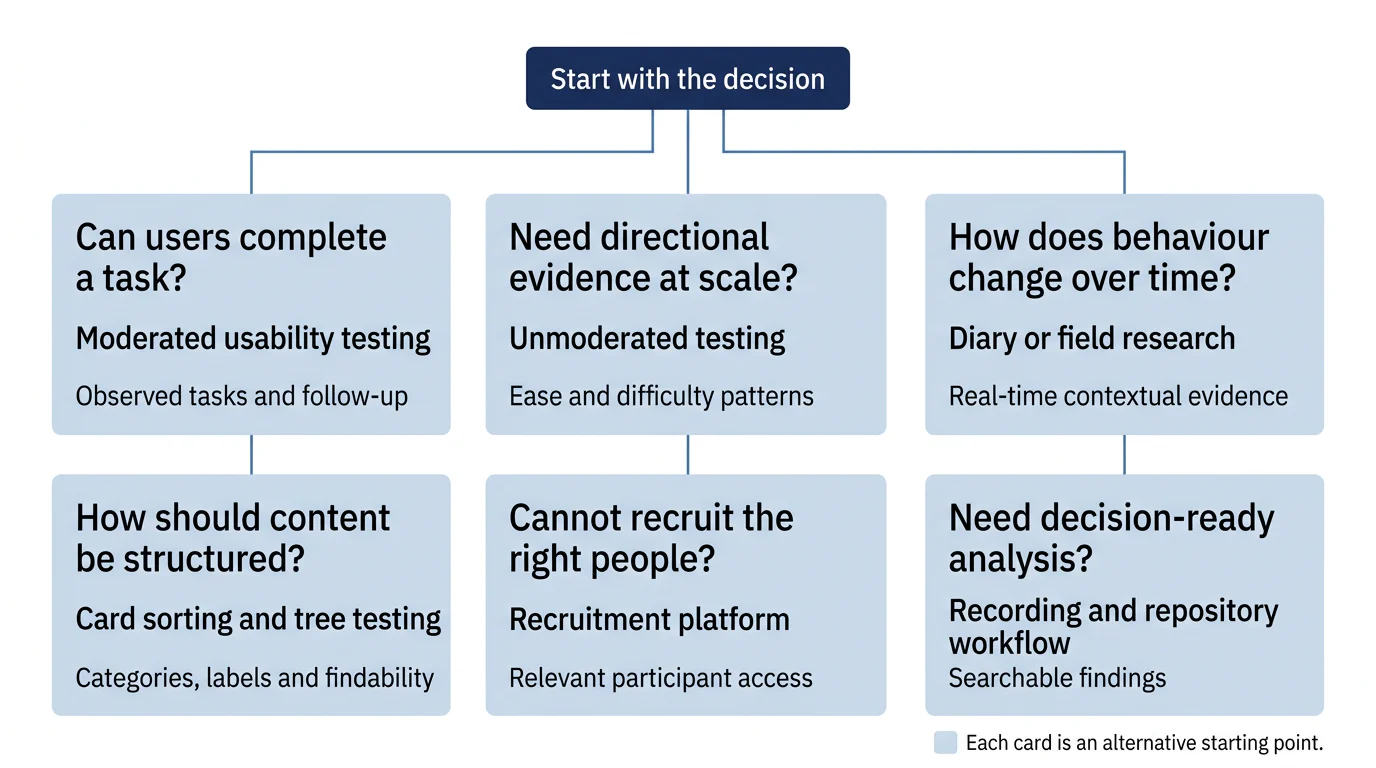
How we built this list
How the ranking was set
The ranking favours a clear answer to a specific study decision over the longest feature list. Prices and plan limits were checked against Respondent’s pricing page, User Interviews’ pricing page, Optimal’s pricing page, Lyssna’s pricing page, and Dovetail’s pricing page as of September 2026. Participant incentives, panel orders, advanced targeting, and enterprise features can change the final cost, so compare the full study budget rather than the software fee alone.
A moderated session is appropriate when the team needs to observe task attempts and ask follow-up questions. The UK Government’s moderated usability testing guidance describes this as watching participants complete specific tasks and recommends recruiting actual or likely users.
This page is published by qualfacto. If anything here is out of date, tell us and we will correct it.
Sources
- 1.Using moderated usability testing, UK Government Digital Service, 2017
- 2.Survey development toolkit, UK Government Analysis Function, 2023
- 3.Shaping the future of user research, HM Revenue & Customs, 2019
- 4.User research techniques for content designers, UK Department for Environment, Food & Rural Affairs, 2022
- 5.Taking notes and recording user research sessions, UK Government Digital Service, 2017
- 6.Data protection obligations, European Commission, 2026
- 7.Digital Personal Data Protection Rules, 2025, Ministry of Electronics and Information Technology, Government of India, 2025